
dora-rs/dora-robomaster
收藏资源简介:
--- configs: - config_name: image data_files: - split: train path: graphs/out/*/image.parquet - config_name: mistral data_files: - split: train path: graphs/out/*/mistral_output_file.parquet - config_name: chatgpt data_files: - split: train path: graphs/out/*/chatgpt_output_file.parquet - config_name: raw_file data_files: - split: train path: graphs/out/*/raw_file.parquet - config_name: saved_file data_files: - split: train path: graphs/out/*/saved_file.parquet - config_name: audio data_files: - split: train path: graphs/out/*/audio.parquet - config_name: whisper_text data_files: - split: train path: graphs/out/*/whisper_text.parquet - config_name: control data_files: - split: train path: graphs/out/*/control.parquet - config_name: gimbal_control data_files: - split: train path: graphs/out/*/gimbal_control.parquet - config_name: logs data_files: - split: train path: graphs/out/*.txt license: apache-2.0 language: - en tags: - dora - robotic --- # Dora-Robomaster This project aims to use Dora to enhance the capabilities of a RoboMaster S1. You can see a quick demo here: [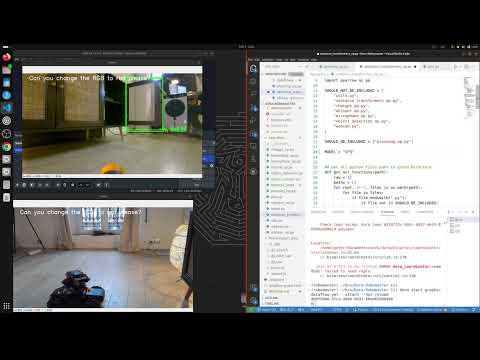](http://www.youtube.com/watch?v=NvvTEP8Jak8) ### Getting Started command to start the demo: ```bash alias dora='dora-cli' dora up dora start graphs/dataflow.yml --attach ``` start the reaction lighting test: `dora start graphs/reaction.yml --attach` ## Installation of the Robomaster S1 Hack This guide is an updated version of the original [Robomaster S1 SDK Hack Guide](https://www.bug-br.org.br/s1_sdk_hack.zip) and is intended for use on a Windows 11 system. ### Prerequisites Before you get started, you'll need the following: - Robomaster S1 (do not update it to the latest version, as it may block the hack). - [Robomaster App](https://www.dji.com/fr/robomaster-s1/downloads). - [Android SDK Platform-Tools](https://developer.android.com/tools/releases/platform-tools). Simply unzip it and keep the path handy. - A micro USB cable. If this guide doesn't work, there might be an issue with the cable, and you may need to replace it with one that supports data transfer. ### Instructions 1. Start the Robomaster App and connect the Robomaster S1 using one of the two options provided (via router or via Wi-Fi). 2. While connected, use a micro USB cable to connect the robot to the computer's USB port. You should hear a beep sound, similar to when you connect any device. (Please note that no other Android device should be connected via USB during this process). 3. In the Lab section of the app, create a new Python application and paste the following code: ```python def root_me(module): __import__ = rm_define.__dict__['__builtins__']['__import__'] return __import__(module, globals(), locals(), [], 0) builtins = root_me('builtins') subprocess = root_me('subprocess') proc = subprocess.Popen('/system/bin/adb_en.sh', shell=True, executable='/system/bin/sh', stdout=subprocess.PIPE, stderr=subprocess.PIPE) ``` 4. Run the code; there should be no errors, and the console should display **Execution Complete** 5. Without closing the app, navigate to the folder containing the Android SDK Platform-Tools and open a terminal inside it. 6. Run the ADP command `.\adb.exe devices `. If everything is working correctly, you should see output similar to this:  7. Execute the upload.sh script located in the folder `s1_SDK`. 8. Once everything has been executed, restart the S1 by turning it off and then back on. While it's booting up, you should hear two chimes instead of the usual single chime, indicating that the hack has been successful. ## HuggingFace Dataset To set up this repo as a dataset repository: ```bash git lfs install git clone https://huggingface.co/datasets/haixuantao/dora-robomaster # if you want to clone without large files – just their pointers # prepend your git clone with the following env var: GIT_LFS_SKIP_SMUDGE=1 ``` To use the dataset: ```python from datasets import load_dataset dataset = load_dataset("haixuantao/dora-robomaster") ```
configs: - 配置名称:图像(image) 数据文件: - 划分:训练集 路径:graphs/out/*/image.parquet - 配置名称:Mistral(mistral) 数据文件: - 划分:训练集 路径:graphs/out/*/mistral_output_file.parquet - 配置名称:ChatGPT(chatgpt) 数据文件: - 划分:训练集 路径:graphs/out/*/chatgpt_output_file.parquet - 配置名称:原始文件(raw_file) 数据文件: - 划分:训练集 路径:graphs/out/*/raw_file.parquet - 配置名称:保存文件(saved_file) 数据文件: - 划分:训练集 路径:graphs/out/*/saved_file.parquet - 配置名称:音频(audio) 数据文件: - 划分:训练集 路径:graphs/out/*/audio.parquet - 配置名称:Whisper文本(whisper_text) 数据文件: - 划分:训练集 路径:graphs/out/*/whisper_text.parquet - 配置名称:控制(control) 数据文件: - 划分:训练集 路径:graphs/out/*/control.parquet - 配置名称:云台控制(gimbal_control) 数据文件: - 划分:训练集 路径:graphs/out/*/gimbal_control.parquet - 配置名称:日志(logs) 数据文件: - 划分:训练集 路径:graphs/out/*.txt license: Apache-2.0 language: - 英语 tags: - dora - 机器人 # Dora-Robomaster 本项目旨在使用Dora工具增强机甲大师S1(RoboMaster S1)的功能。您可在此查看快速演示: [](http://www.youtube.com/watch?v=NvvTEP8Jak8) ### 快速入门 启动演示的命令如下: bash alias dora='dora-cli' dora up dora start graphs/dataflow.yml --attach 启动反应灯光测试的命令: `dora start graphs/reaction.yml --attach` ## 机甲大师S1(RoboMaster S1)破解安装指南 本指南为原始《Robomaster S1 SDK破解指南》的更新版本,适用于Windows 11系统。 ### 前置依赖 在开始操作前,您需要准备以下内容: - 机甲大师S1(RoboMaster S1):请勿更新至最新固件版本,否则可能阻断破解操作。 - [机甲大师应用(Robomaster App)](https://www.dji.com/fr/robomaster-s1/downloads)。 - [Android SDK 平台工具(Android SDK Platform-Tools)](https://developer.android.com/tools/releases/platform-tools):仅需解压该工具包并记录其路径即可。 - 一根Micro USB数据线:若操作失败,可能是线材问题,需更换为支持数据传输的Micro USB数据线。 ### 操作步骤 1. 启动机甲大师应用,通过两种方式之一连接机甲大师S1(通过路由器或Wi-Fi直连)。 2. 保持连接状态,使用Micro USB数据线将机器人连接至电脑的USB接口。此时您将听到提示音,与普通设备连接时一致。(请注意:操作过程中请勿同时通过USB连接其他安卓设备。) 3. 在应用的"实验室"板块中,新建一个Python应用,并粘贴如下代码: python def root_me(module): __import__ = rm_define.__dict__['__builtins__']['__import__'] return __import__(module, globals(), locals(), [], 0) builtins = root_me('builtins') subprocess = root_me('subprocess') proc = subprocess.Popen('/system/bin/adb_en.sh', shell=True, executable='/system/bin/sh', stdout=subprocess.PIPE, stderr=subprocess.PIPE) 4. 运行该代码,若无报错,控制台将显示**执行完成**。 5. 请勿关闭应用,前往包含Android SDK平台工具的文件夹,并在此处打开终端。 6. 运行ADB命令 `.adb.exe devices`。若一切正常,您将看到类似如下的输出: 7. 执行`s1_SDK`文件夹中的`upload.sh`脚本。 8. 所有操作执行完毕后,重启机甲大师S1:先关机再开机。开机过程中,您将听到两声提示音,而非常规的单声提示音,这代表破解成功。 ## Hugging Face 数据集 将本仓库设置为数据集仓库的命令如下: bash git lfs install git clone https://huggingface.co/datasets/haixuantao/dora-robomaster # 若您希望仅克隆大文件的指针而非完整大文件 # 请在git clone命令前添加如下环境变量: GIT_LFS_SKIP_SMUDGE=1 使用该数据集的代码如下: python from datasets import load_dataset dataset = load_dataset("haixuantao/dora-robomaster")
数据集概述
数据集配置
- image:
- 分割: train
- 路径: graphs/out/*/image.parquet
- mistral:
- 分割: train
- 路径: graphs/out/*/mistral_output_file.parquet
- chatgpt:
- 分割: train
- 路径: graphs/out/*/chatgpt_output_file.parquet
- raw_file:
- 分割: train
- 路径: graphs/out/*/raw_file.parquet
- saved_file:
- 分割: train
- 路径: graphs/out/*/saved_file.parquet
- audio:
- 分割: train
- 路径: graphs/out/*/audio.parquet
- whisper_text:
- 分割: train
- 路径: graphs/out/*/whisper_text.parquet
- control:
- 分割: train
- 路径: graphs/out/*/control.parquet
- gimbal_control:
- 分割: train
- 路径: graphs/out/*/gimbal_control.parquet
- logs:
- 分割: train
- 路径: graphs/out/*.txt
许可证
- apache-2.0
语言
- en
标签
- dora
- robotic


